Create and configure a paper
A paper is a timed unit inside an exam. It can represent a subject, course, module, or another assessment segment. One exam can contain several papers.
Create a paper
- Create or open an exam project.
- Right-click the exam in Exam Explorer.
- Select New Exam Paper.
- Select the new paper, such as Paper 1.
- Complete its properties.
Paper titles must be unique within the exam.
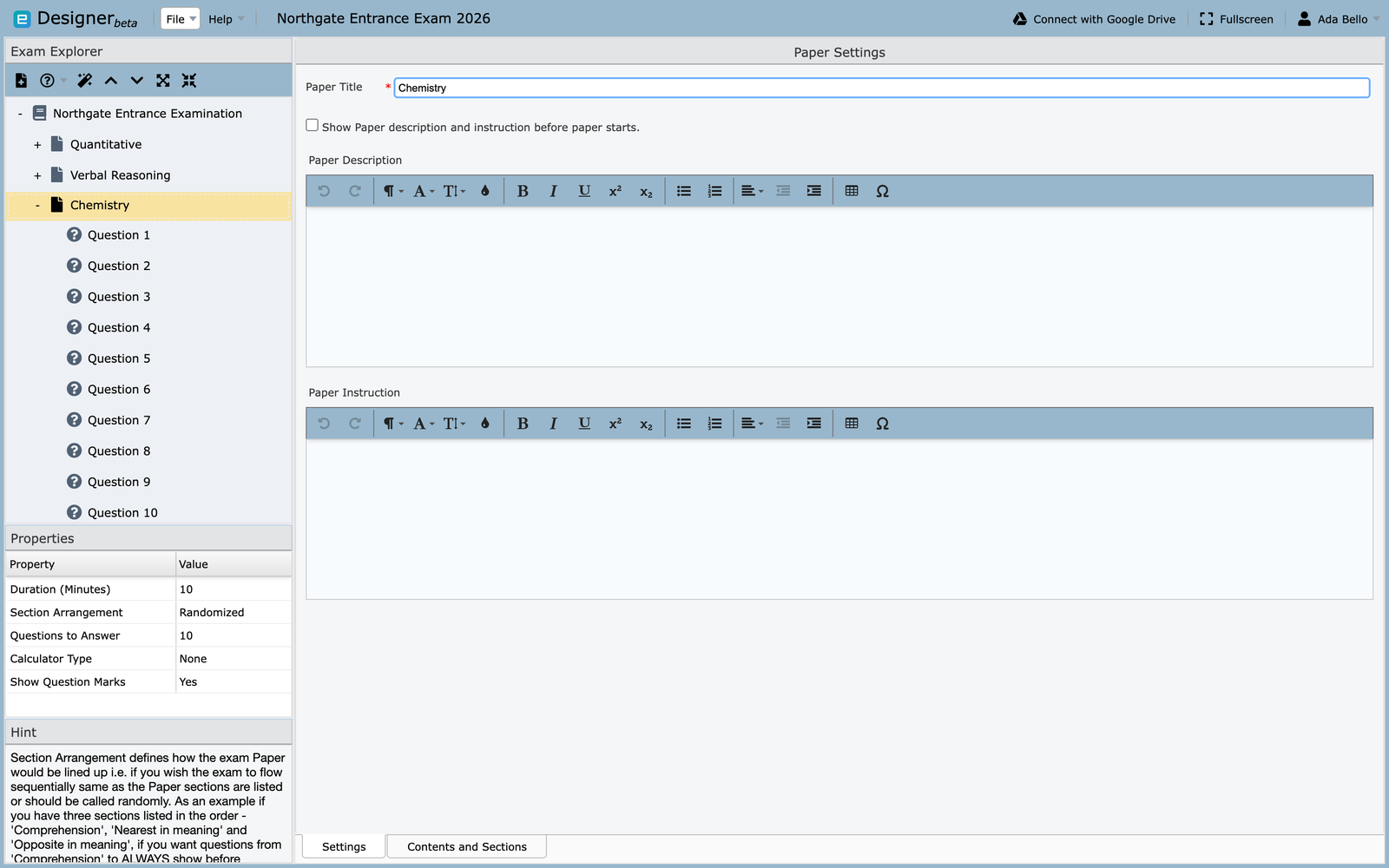
Paper properties
Paper Title
: The examinee-facing name, such as Mathematics, Aptitude, or Biology 201.
Description and Instruction
: Optional unless Show Description and Instruction before paper starts is enabled. Explain the paper-specific timing, choice, calculator, or navigation rules.
Paper Duration
: The allowed time in minutes. The minimum duration is five minutes.
Section Arrangement
: Controls whether sections are presented sequentially or selected in a randomized order.
Questions to Answer
: Sets how many questions Client presents from the available pool. Use this to draw a randomized subset from a larger question bank.
Set the questions-to-answer value after authoring is complete. Adding questions later can reset it to the paper's total question count, so verify it again before export.
Calculator Type
: Allows no calculator or one of the supported Simple, Advanced, or Base calculators.
Show Question Marks
: Controls whether the score value assigned to each question is visible to the examinee.
Sections and content
Open Contents and Sections to create sections and set:
- the order of sections;
- sequential or randomized questions within a section; and
- how many questions are selected from each section.
For example, a language paper can contain Oral, Comprehension, and Vocabulary sections in a fixed order while randomizing questions inside each section.
Reuse questions
To duplicate existing content in the open project, copy a question and paste it into the destination paper. See Reuse project content for the supported workflow. To pull questions in from a document or another project, right-click the paper and see Import existing content.
Validate the paper
- The title is unique and recognizable.
- Duration and instructions agree.
- Section order and randomization are intentional.
- Questions-to-answer counts do not exceed the available pool.
- Calculator and score-display settings are appropriate.
- Every question has been previewed.
Continue with Creating questions.